

A redstone comparator is a small block that reads a signal from behind it, checks the signals coming in from its two sides, and sends a result out of its front. This comparator guide starts with the basics. In Survival, you can craft one from 3 stone, 3 redstone torches, and 1 nether quartz, as the Minecraft Wiki lists it. Once it’s placed, a signal takes 2 game ticks, or 0.1 seconds, to travel from its inputs to its output, so the reaction is almost instant. Its output ranges from 0 to 15, and when it reads a container, that range shows how full the container is.
Think of the comparator as a tiny calculator with two modes. In compare mode, it passes the rear signal along only when neither side signal is stronger. In subtract mode, it takes the stronger side signal away from the rear one, and the result never drops below zero. Its readings run from 0 to 15, which is how a chest full of items can tell your circuit how much it holds. Learn these rules, and your first redstone builds will start to make sense.
Key Takeaways
- You can craft a redstone comparator in Survival with 3 stone, 3 redstone torches, and 1 Nether quartz, so start gathering those materials before your first build.
- A redstone comparator in compare mode passes the rear signal through only while neither side signal is stronger, so a rear signal of 10 with a side signal of 12 turns the output off.
- A redstone comparator in subtract mode takes the stronger side signal away from the rear signal, so a rear signal of 12 with a side signal of 5 gives you an output of 7, and the result never drops below 0.
- A redstone comparator reads a chest as a signal from 0 to 15 based on the average fullness of its slots, so an egg chest reads higher than a diamond chest holding the same number of items.
How Does a Redstone Comparator Work in Minecraft?
A redstone comparator takes the signal from its rear input, checks it against the signals on its two side inputs, and sends the result out of its front output. The rear signal is the main signal, the one your circuit wants to pass along. The side inputs are what the comparator uses to check that main signal.
Picture a comparator sitting on a flat floor with a line of redstone dust leading into its back. That dust is the rear input. Run another line of dust into the block on the left or right of the comparator, and you have a side input. Every comparator has these same three parts, so once you spot them, you can read almost any circuit.
The front output is where your wiring plans matter most. A comparator points in the direction you face when you place it, and its output always leaves through the front. If you place it facing a wall of wires or a block that doesn’t accept redstone, the result has nowhere useful to go. Before you place it, decide where the signal should travel, then face that way.
Compare mode shows how the three parts work together. The rear signal passes through only when neither side signal is stronger. Say your rear dust carries signal strength 10 and one side input carries 12. The side signal wins, and the output turns off.
Timing is the last piece. A signal needs 2 game ticks, or 0.1 seconds, to move from the inputs to the output. That’s quick, but the delay adds up when you chain several comparators in a row, so keep it in mind when you plan a longer build.
What Are Compare and Subtract Modes?
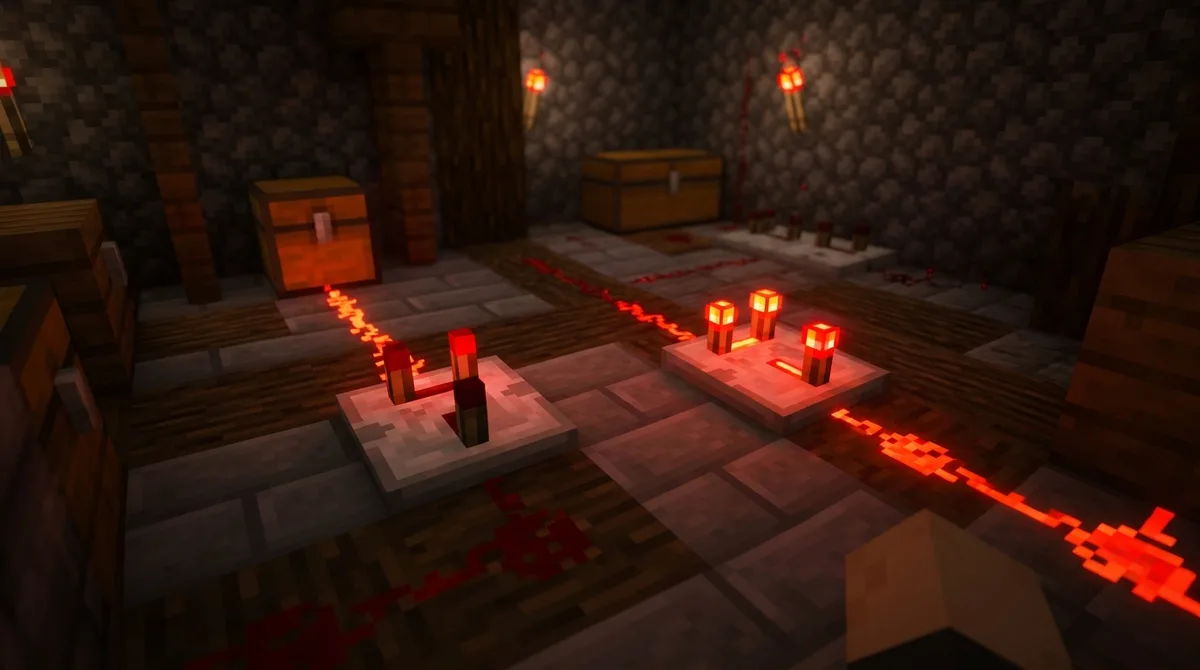
Compare mode and subtract mode are the two settings that decide how a comparator handles the signals it reads. To switch between them, right-click the block, and it changes right away.
In compare mode, the rear signal passes through unchanged, but only while neither side signal is stronger. If your rear dust carries strength 10 and a side input carries 4, the output stays at 10. If a side input rises above the rear signal, the output turns off.
Subtract mode works differently. The comparator takes the stronger side signal away from the rear signal and sends out whatever is left. If the rear signal is 12 and a side signal is 5, the output is 7. If both sides carry signals, only the stronger one counts.
Subtraction can never go below zero. When the side signal is bigger than the rear signal, the result would be negative, so the output simply becomes 0. Here is how the same rear signal behaves in each case:
- Compare mode, rear 10, side 4: output 10
- Compare mode, rear 10, side 12: output off
- Subtract mode, rear 12, side 5: output 7
- Subtract mode, rear 12, side 14: output 0
You don’t have to guess which mode a comparator is in. Its look on the block shows whether it is set to compare or subtract, and the same block also shows whether it is powered. Checking those two things before you test a circuit can save you a lot of troubleshooting.
How Do Comparators Read Chest and Hopper Contents?
A comparator reads a container by turning the average fullness of its slots into a signal from 0 to 15. An empty container sends 0. A container with anything in it sends the floor of 1 plus 14 times that average fullness, so a half-full chest gives a middle-strength signal and a packed chest gives a strong one.
Each slot’s fullness is its item count divided by that item’s maximum stack size. Stack limits change the result a lot. Eggs stack to 16, so a slot holding 16 eggs counts as completely full. Diamonds stack to 64, so 16 diamonds fill only a quarter of the same slot. A chest of eggs will read much higher than a chest holding the same number of diamonds. Tools stack to 1, so a single tool fills its slot entirely.
Here’s a simple example. Say a dispenser holds 300 items that stack to 64. Those items fill only about half of the capacity of its 9 slots on average. The comparator rounds that down and shows signal strength 8, because the average never reaches the level needed for 9.
A comparator reads the whole container, not just the part touching it. On a large chest, it measures all 54 slots, even if the comparator sits against only one half. Your circuit doesn’t need to reach every slot, and a comparator placed on any side gives the same reading.
The comparator reads more than chests. It works with barrels, hoppers, furnaces, droppers, and shulker boxes too. A furnace reading changes as its fuel, input, and output slots fill, so it can tell your circuit how far along a smelting job has come. Shulker boxes follow the same rules as chests, which makes them handy for storing and reading items at the same time.
To try this yourself, place a chest with a few stacks of items next to a comparator, and run a line of redstone dust from the comparator’s front to a redstone lamp. Add items and the lamp lights up. Remove them all, and the signal drops to 0 and the lamp goes dark.
How to Craft a Redstone Comparator in Survival
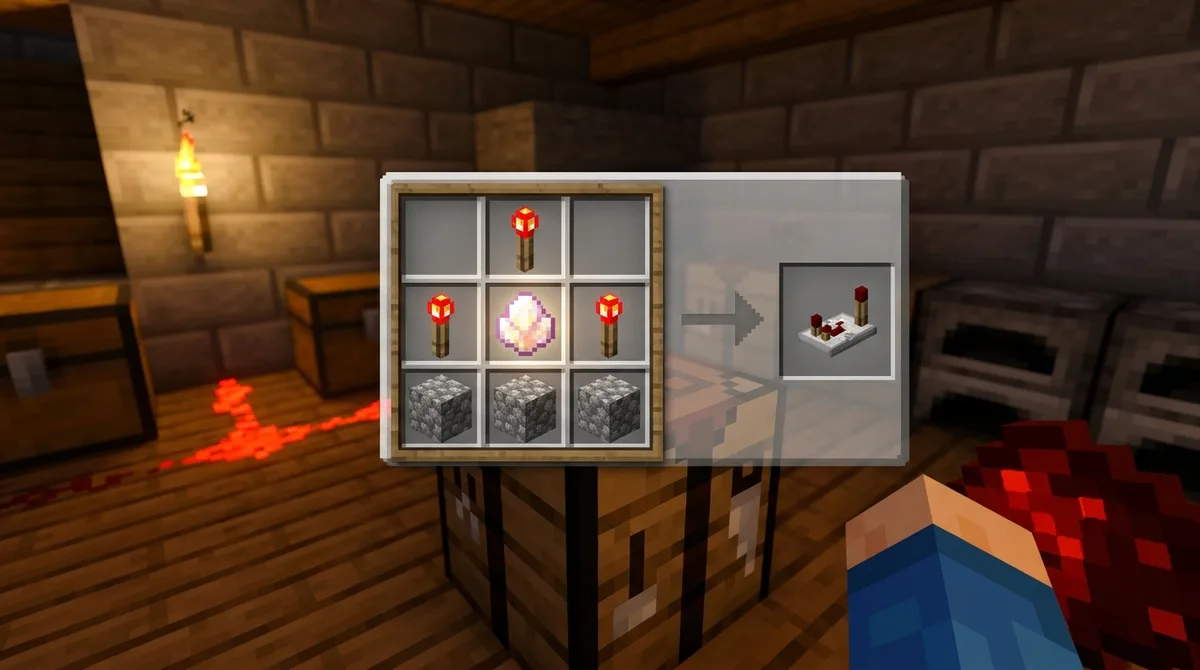
Crafting a comparator in Survival takes only a few materials, and each one has a clear job. The stone forms the sturdy base, the redstone torches provide the signals the comparator reads and sends, and the Nether quartz is the core piece that lets the block compare signals at all.
Nether quartz comes from mining Nether quartz ore in the Nether, or from trading gold ingots with piglins there. Redstone torches need redstone dust and sticks, so gather those first if you don’t have any torches yet.
Once your materials are ready, open a crafting table and follow these steps:
- Craft your redstone torches by placing 1 redstone dust above 1 stick in the crafting grid.
- Place a redstone torch in the top middle slot of the grid.
- Place a redstone torch on the left and another on the right of the middle row.
- Put the Nether quartz in the center slot of the middle row, between the two torches.
- Fill the entire bottom row with your three stone blocks.
- Take the finished comparator from the output slot.
Where Can You Find Comparators in Creative Mode?
In Creative mode, you’ll find the comparator in the Redstone tab of the creative inventory. Open your inventory with the E key, then click the tab with the redstone dust icon. The comparator sits with the other redstone parts, so you can skip crafting it from stone, torches, and Nether quartz.
If you want one right away, type /give @p minecraft:comparator into chat. The item ID minecraft:comparator tells the game which block to hand you, and @p targets the nearest player. You can also add a number at the end, such as /give @p minecraft:comparator 16, to receive several at once.
The Redstone tab also holds the other parts you’ll wire up alongside comparators:
- Redstone torches, which supply the signals your rear and side inputs read
- Repeaters, which strengthen a signal and delay it along a long run
- Redstone dust, which carries the signal from one block to the next
Grab a few of each before you start a build. That way you can test a chest readout or a subtraction circuit without stopping to gather materials.
Do Comparators Work the Same on Java and Bedrock?

Yes, redstone comparators work in both Java Edition and Bedrock Edition, and the rules covered in this guide apply to each. Compare mode, subtract mode, and container readings behave the same way on both platforms.
Some newer features depend on your version, though. The Bedrock Edition 1.21 release notes, posted June 13, 2024, describe a comparator reading from the Crafter, a block that crafts items from a grid of slots. This output runs from 0 to 9. Each nonempty or toggled Crafter slot adds 1 to the signal strength, so a Crafter with 4 filled slots sends strength 4, and a Crafter with all 9 slots active sends strength 9.
Before you follow a build that uses the Crafter output, check your game version. Look at the version number on the title screen, then compare it with the version the build was made for. Older versions don’t have this output, so a circuit that depends on it won’t work as written. If your version is older, use a build that relies only on container readings, side inputs, or subtraction, since those rules have been part of the game for much longer.
Which Beginner Comparator Builds Should You Try First?
Start with these three builds in order: a container readout, a side-input comparison, and a subtraction circuit. Each one isolates a single rule, so you can watch the math happen on your screen.
Build 1: the container readout. Place a chest directly behind a comparator, then run a line of redstone dust from the comparator’s front to a redstone lamp. Add a few stacks of items to the chest and watch the lamp light up. Empty the chest, and the lamp goes dark once the reading drops to 0. This shows that a container’s fullness becomes a signal from 0 to 15.
Build 2: the side-input comparison. Power the rear with a lever on a dust line, and place a second lever on a side input. Turn on the rear lever first, and the lamp stays lit. Then feed the side from a redstone block, which sends the maximum strength of 15. The lamp goes dark even though the rear line is still powered. Compare mode is doing its job: the stronger side signal turns the output off.
Build 3: the subtraction circuit. Right-click the comparator to switch it to subtract mode. Use a chest reading of 15 as the rear signal, and feed a weaker lever-fed line into one side. Your lamp stays lit, since the output is still above zero. Swap in the redstone block as the side, and the output drops to 0. Watching the lamp change is the easiest way to see the subtraction rule at work.
Building Your First Comparator Circuit Next Steps
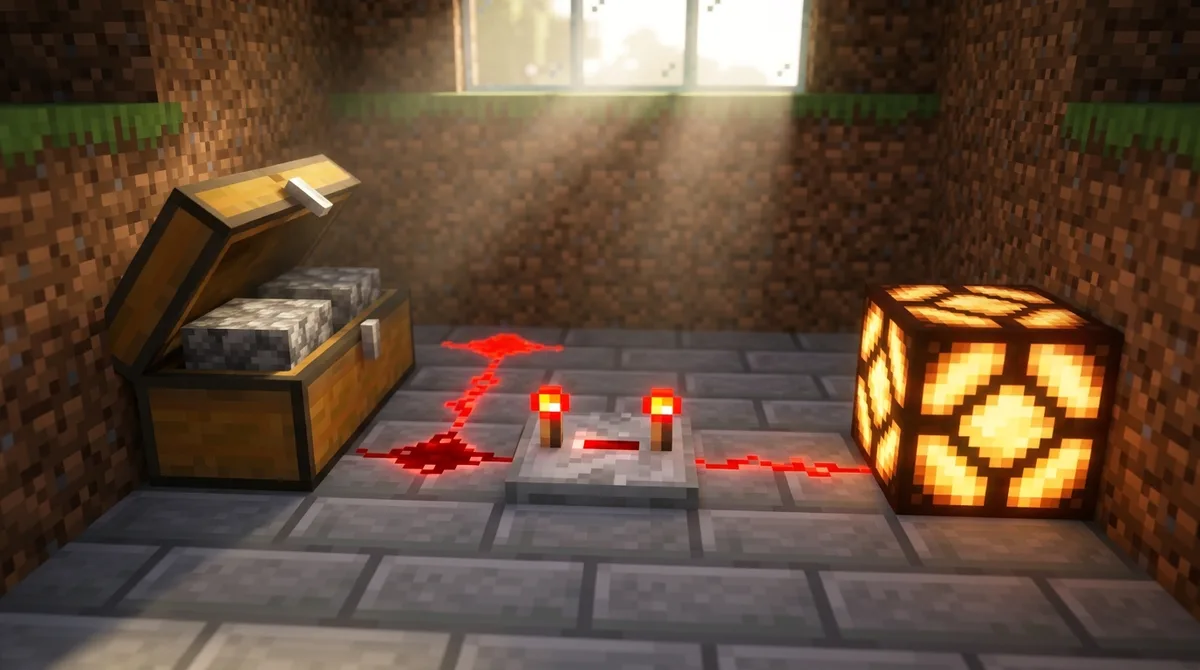
Start with the container readout build, since you can watch the lamp brighten with every stack you add. Build it on a flat area with nothing nearby, so the redstone dust line and the lamp stay easy to see. Test each new build the same way, one change at a time, so you know exactly which part caused a change in the signal. Once compare mode and subtract mode feel familiar, try using comparators to trigger automated farms or item sorters. A comparator reading a chest can tell a circuit when storage is nearly full, which is a useful cue for switching to a second chest.
Testing Stack Limits and Subtraction
Your next step is to test the stack-limit rule yourself. Fill every slot of a chest with 16 eggs, and each slot counts as completely full. Then empty the chest and fill each slot with 16 diamonds instead, where each slot counts as only a quarter full. Place each chest behind a comparator in the subtraction circuit from the last build, and the egg chest will leave a noticeably higher output. That shows stack size changes the reading as much as the item count does.
Once that feels clear, rebuild the subtraction circuit with the chest as your rear signal. Pull items out one stack at a time and watch for the lamp to go dark once the rear reading falls to the side signal’s level. Then repeat the test with a shulker box, which follows the same reading rules as a chest, and see whether your numbers match.
Keep a short notebook with the rear, side, and output values you observe for each build. Patterns will show up quickly, and they will make later circuits easier to troubleshoot. When you feel ready, look for an automated farm or item sorter where a chest reading could tell a circuit that storage is nearly full, so it can switch items to a second chest before the first one overflows.