
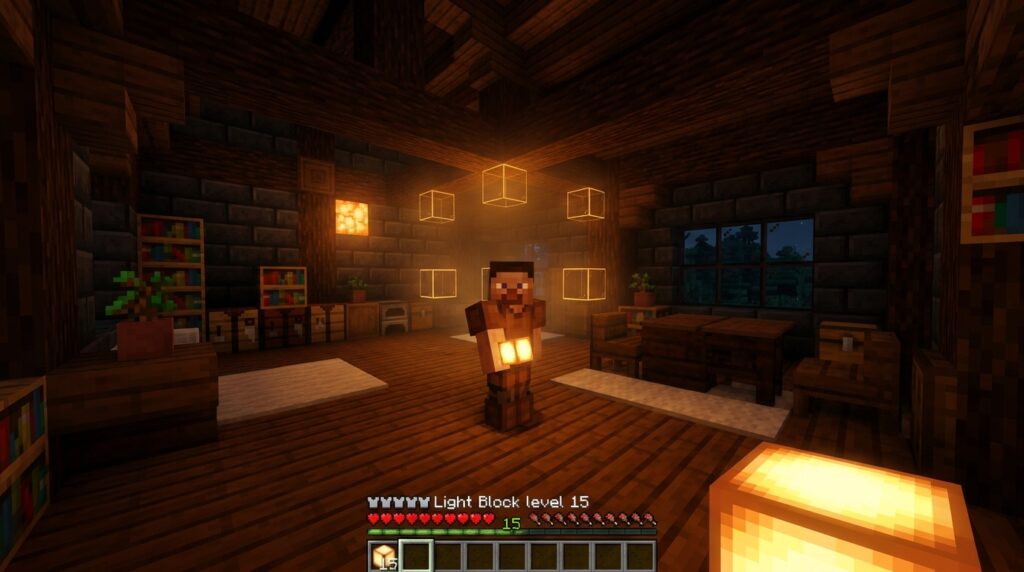
You just spent hours building an awesome medieval castle, but placing ugly torches everywhere ruins the aesthetic. Luckily, light block commands give you a secret way to illuminate your builds without any visible blocks getting in the way. You can spawn completely invisible light sources that you and other players can walk right through. These handy blocks let you customize the exact brightness level anywhere from a dim glow to maximum strength.
Imagine brightening up a dark underground cave path or highlighting a detailed armor display without a single lantern in sight. Because these blocks have no collision and turn invisible when unequipped, your builds stay clean while remaining safe from hostile mobs. You can even right-click a placed light block in Creative mode to cycle through brightness settings on the fly. It is the ultimate trick to give your survival bases and adventure maps a polished look.
Key Takeaways
- Invisible light blocks provide non-solid illumination that keeps builds safe from hostile mobs without cluttering aesthetics with visible torches or lanterns.
- Light blocks must be spawned using specific
/givecommands in Java or Bedrock editions, as they cannot be crafted or found in the standard Creative inventory. - Brightness is customizable from light level 0 (darkness) to 15 (full daylight), which can be set via commands or cycled on the fly by right-clicking placed blocks in Creative mode.
- Placing hidden light blocks in high ceilings, foliage, or underwater features allows for seamless, atmospheric lighting across indoor and outdoor spaces.
Spawning Light Blocks with Java and Bedrock Commands
If you want to illuminate your build without cluttering your walls with torches or lanterns, invisible light blocks are your best friend. These hidden light sources let you create completely seamless, clean spaces in any room. Since you cannot craft them or find them in the standard Creative inventory, you need to use a simple chat command to spawn them into your hotbar. Both Minecraft Java Edition and Bedrock Edition support these commands, giving you full control over the exact brightness level from 0 all the way up to 15. Once you learn the quick syntax for your platform, you can instantly add as many light sources as you need to brighten up dark corners.
- Java Edition:
/give @p light[block_state={level:15}] - Bedrock Edition:
/give @s light_block 1 15
Entering these commands into your chat box puts the light block directly into your active hotbar slot. In Java Edition, changing the number inside the bracket lets you customize the exact brightness level before placing it. For Bedrock Edition, the first number sets the item quantity you receive, while the second number dictates the light level output. If you leave off the light level in Bedrock, the game defaults to giving you a maximum strength block with a light level of 15. Using these precise commands saves time and ensures your build gets the exact mood lighting you want right away.
After you spawn the blocks, you can place them anywhere in the air or against surfaces just like normal blocks. They remain completely invisible and non-solid, meaning you and other players walk right through them without bumping into anything. If you ever need to see where you placed your invisible lights, simply hold a light block item in your hand to reveal their glowing particle icons. You can also right-click a placed light block in Creative mode to cycle through its light levels on the fly. This makes interior decoration easy because you can fine-tune your room lighting without hiding glowstone behind trapdoors.
Setting Light Levels from Zero to Maximum Brightness

Tired of cluttering your detailed builds with torches, lanterns, or glowstone blocks just to stop hostile mobs from spawning? Invisible light blocks solve this problem by providing customizable illumination that completely disappears when you put the item away. You can easily adjust the brightness anywhere from light level 0, which emits complete darkness, up to light level 15, which matches full daylight. In Creative mode, changing this intensity is as simple as placing the light block and right-clicking it while holding another light block in your hand. Every right-click cycles the brightness up by one level until it hits 15, after which it resets back to zero. This quick trick lets you tweak the mood of your room instantly without typing another command.
If you want to save time while placing dozens of light sources, you can spawn light blocks with a specific brightness level directly into your inventory using commands. For Java Edition, typing /give @p light[block_state={level:15}] grants you a stack of maximum brightness light blocks ready for immediate placement. Bedrock Edition players can use a similar command by typing /give @p light_block 1 15 to get the same maximum output. Changing that last number in either command allows you to customize your light output before placing a single block. This technique works wonders when you need consistent lighting across a massive build without constantly right-clicking every individual block.
Matching the right light level to your specific build design elevates your Minecraft creations into atmospheric spaces. Dimmer settings create mysterious glows for spooky dungeons, while medium settings offer a soft feel that works perfectly for rustic taverns. Maximum settings at level 15 provide crisp illumination suitable for modern homes, art galleries, and large underground bases. Experimenting with these varying intensities helps you control shadows and highlight architectural details that visible light sources usually cover up. Using custom light levels guarantees your build stays safe from hostile mobs while keeping your overall design clean.
- Level 0: Complete darkness with zero light output, useful for hiding blocks.
- Level 7: Soft ambient light ideal for cozy bedrooms and dim taverns.
- Level 15: Full daylight brightness matching glowstone and sea lanterns.
Hiding Invisible Lights in Rooms and Outdoor Spaces
When building massive structures with high ceilings, like a cathedral or a deep underground dungeon, getting enough illumination down to the floor without cluttering your build with floating lanterns can feel impossible. By using the light block command, you can place invisible light sources anywhere in the air to flood the ground below with clean, bright light. You can tweak the brightness level from 0 all the way up to 15 to get the exact atmosphere you want. Placing a few hidden level 15 light blocks near your high rafters keeps hostile mobs from spawning on your floors while preserving your clean architectural lines. You will never have to ruin a rustic wooden build with awkward torches stuck on every wall again.
Outdoor areas and water features benefit just as much from these invisible light sources as your indoor rooms do. If you have an underwater pond or a winding garden path, dropping light blocks directly into the water or floating them inside leafy tree canopies keeps your scenery looking natural at night. Mobs will not spawn in your dark flower beds, and you will not have to hide sea lanterns beneath trapdoors in your pond floor. Since players and mobs walk right through these invisible blocks without bumping into them, your pathways stay completely open and easy to navigate. It is the perfect trick for making your outdoor builds stand out without adding visible clutter to your terrain.
- Level 7: Perfect for moody dungeons and spooky caves where you want just enough light to control mob spawns without ruining the dark atmosphere.
- Level 10: Great for soft, cozy ambient lighting inside bedrooms, warm living spaces, and quiet garden pathways.
- Level 15: Ideal for illuminating massive high-ceiling halls, deep ocean ponds, and wide outdoor yards.
Light Up Your Builds Using Light Block Commands
Transforming your Minecraft builds with hidden lighting is straightforward. By using a simple give command like /give @s light_block, you can instantly spawn invisible blocks that illuminate your rooms without cluttering your design. You no longer have to hide torches behind furniture or spam sea lanterns across your ceiling just to keep hostile mobs away. These secret light sources let your creative builds look clean while giving you full control over the atmosphere. Whether you want a dim basement at light level 5 or a bright gallery at light level 15, light blocks make seamless decoration possible.
Now that you know how light block commands work, jump into your favorite creative world and start experimenting. Try placing a light block at level 12 inside a glass display case, or sprinkle a few low-level light blocks along a stone pathway to create a soft glow. Since these blocks are invisible and have no solid collision, you can walk right through them without ruining your room layout. Grab your favorite give command, test out different brightness settings, and start lighting up your worlds like a pro builder.