
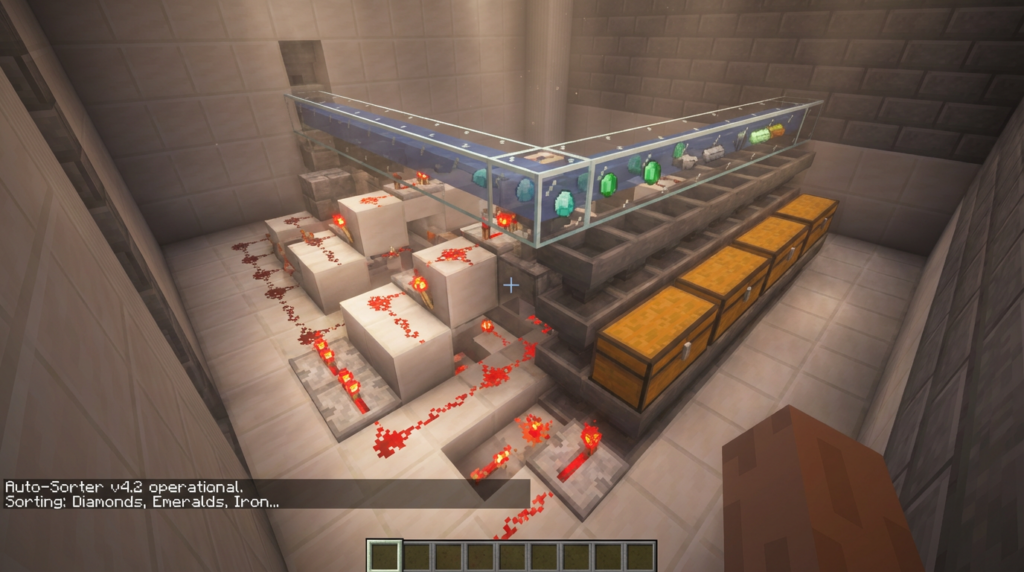
You just returned from a long mining trip with pockets full of diamonds, cobblestone, and raw iron, but the thought of manually organizing your chests feels like a chore. Instead of wasting your playtime clicking through menus, you can let an auto sorter redstone system do the heavy lifting for you. This clever build uses basic items like hoppers and comparators to recognize specific blocks and tuck them away into the right containers. You will finally have a clean base where every piece of coal and stack of wood has its own perfect home.
Building this machine is much easier than it looks and only requires a few common materials like redstone torches and repeaters. By placing a specific filter item inside a hopper, you tell the game exactly which chest should hold your gold ingots or emeralds. This setup prevents your storage room from becoming a messy pile of random blocks and saves you hours of searching later on. You can start with a small row of five chests and easily expand it as your collection of loot grows.
Key Takeaways
- Automate your storage organization using a modular system of hoppers and comparators to eliminate the tedious manual sorting of mining loot and farm drops.
- Create precise item filters by placing 41 of your target resource and four renamed ‘filler’ items into a hopper to ensure only specific blocks enter designated chests.
- Protect your redstone circuitry from overflow errors by using an anvil to rename filter items and building dedicated overflow chests at the end of the hopper line.
- Scale your storage capacity indefinitely by lining up identical redstone modules side-by-side to accommodate new resources as your survival world expands.
Essential Redstone Components For Your Sorter
Hoppers act as the hands of your sorting system by pulling and pushing items through the storage network. You will need to place a row of hoppers facing into your comparators to hold your filter items, which are the specific blocks you want to sort. Below these, a second row of hoppers directs the matched items into your storage chests. These components are essential because they ensure your diamonds, iron ingots, or cobblestone end up in the correct boxes without you having to lift a finger.
The redstone comparator serves as the brain of the filter by measuring exactly how many items are inside a hopper. When you place a specific number of items in the top hopper, the comparator sends out a signal that reaches a certain length. This signal tells the system when a new item has arrived that matches your filter. By detecting these subtle changes in weight, the comparator ensures that only the items you want will pass through to the chests below.
Redstone torches and repeaters work together to act as a gatekeeper for your items. The torch normally keeps the bottom hopper locked so that your filter items do not accidentally drain out into the chest. When the comparator detects a matching item, it sends power through the redstone dust and repeater to briefly turn the torch off. This quick pause allows exactly one item to drop into your storage before the gate closes again. Using these simple parts creates a reliable loop that keeps your massive base organized and clutter free.
Step By Step Guide To Building Modules
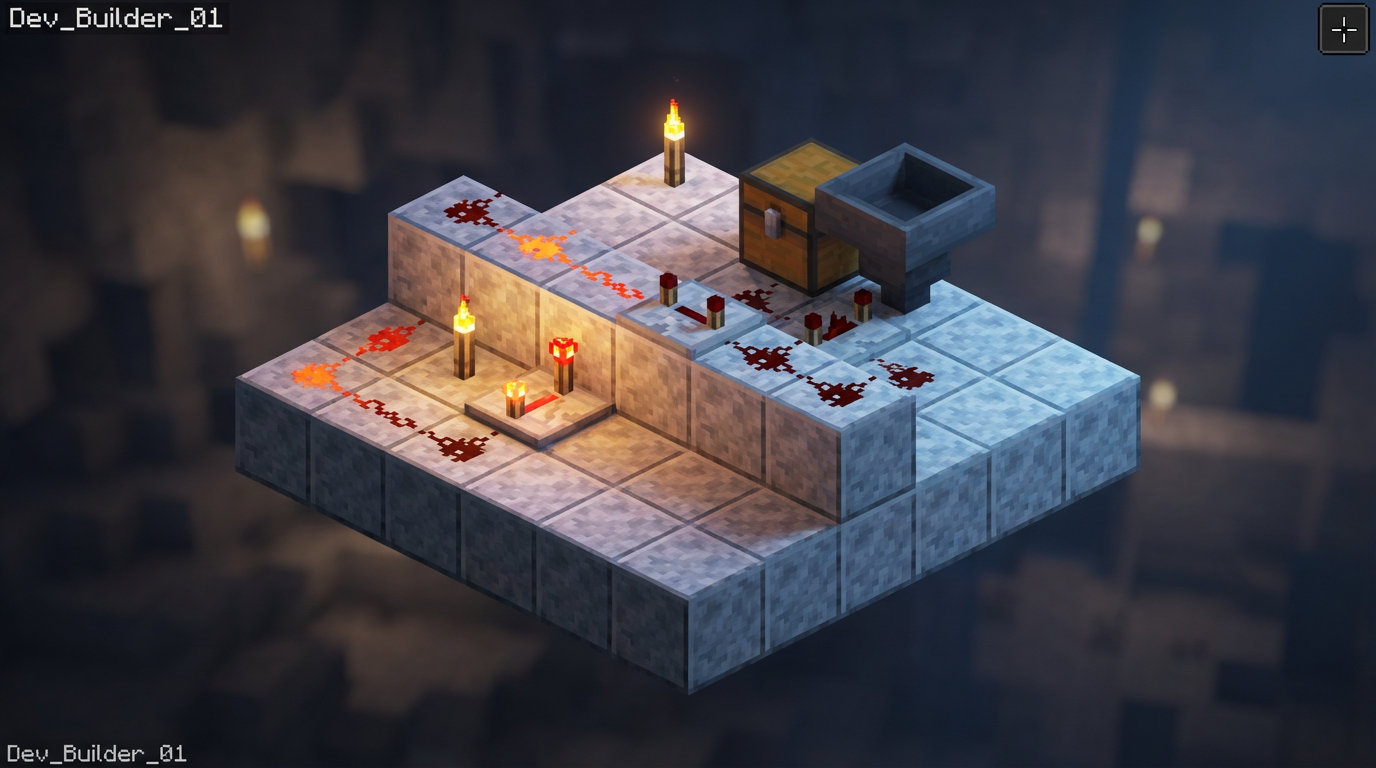
To build your first sorting module, start by placing a double chest and attaching a hopper to the back of it. You will need to build a small staircase of solid blocks behind this hopper to hold your redstone components. Place a redstone torch on the side of the bottom block to keep the hopper locked until the correct item arrives. On the top layer, place a redstone comparator facing away from the hopper to monitor how many items are inside. This simple three block deep footprint allows you to line up as many modules as you want side by side.
Once your frame is ready, lay down three pieces of redstone dust behind the comparator to create a signal trail. You must place a redstone repeater on the middle level facing back toward the chest to bridge the gap between the dust and the torch. This setup ensures that when the signal reaches a certain strength, the torch turns off and lets items flow into your storage. Now you just need to fill the top hopper with your filter items, such as 41 pieces of cobblestone and four renamed sticks. This process creates a perfect filter that only pulls in the specific resource you want to organize.
Troubleshooting Common Inventory Sorting Issues
One of the most frustrating moments in Minecraft is finding your beautiful storage room broken because a chest filled up and leaked into the rest of the system. This usually happens when a single item overflow causes your redstone signal to get too strong, which accidentally triggers the neighboring hoppers to release their filters. To prevent this, you should always build an overflow protection design that limits the signal strength to exactly three blocks of redstone dust. You can also add a simple overflow chest at the very end of your hopper line to catch any items that do not have a designated home. This keeps your redstone stable and ensures that your sorting modules stay independent from one another even when you are mining massive amounts of cobblestone.
The best way to make your auto sorter bulletproof is to use an anvil to rename your filter items. If you use standard items like dirt or sticks to fill the extra slots in your hopper, a random piece of that same material entering the system will get sucked in and break the logic. By renaming a stack of seeds to something unique like Filter Block, you ensure that no other item in the game can ever accidentally stack with them. This simple step creates a unique key that only your system recognizes, preventing the hopper from emptying its essential filter items. It only costs one experience level to rename a full stack, making it a very cheap insurance policy for your hard work.
If you notice that items are skipping past their assigned chests, you should check the timing of your redstone torches and repeaters. Sometimes a laggy server or a misplaced block can prevent the torch from unpowering the hopper quickly enough to grab the passing item. Make sure your comparators are facing the correct direction and that there are no stray redstone signals from nearby machines interfering with the circuit. You can also try double checking the item counts in your filter hopper to ensure they match the specific layout required for your chosen design. Taking a few minutes to verify these small details will save you from having to manually sort your entire inventory later on.
Expanding Your Storage To Handle Massive Farms
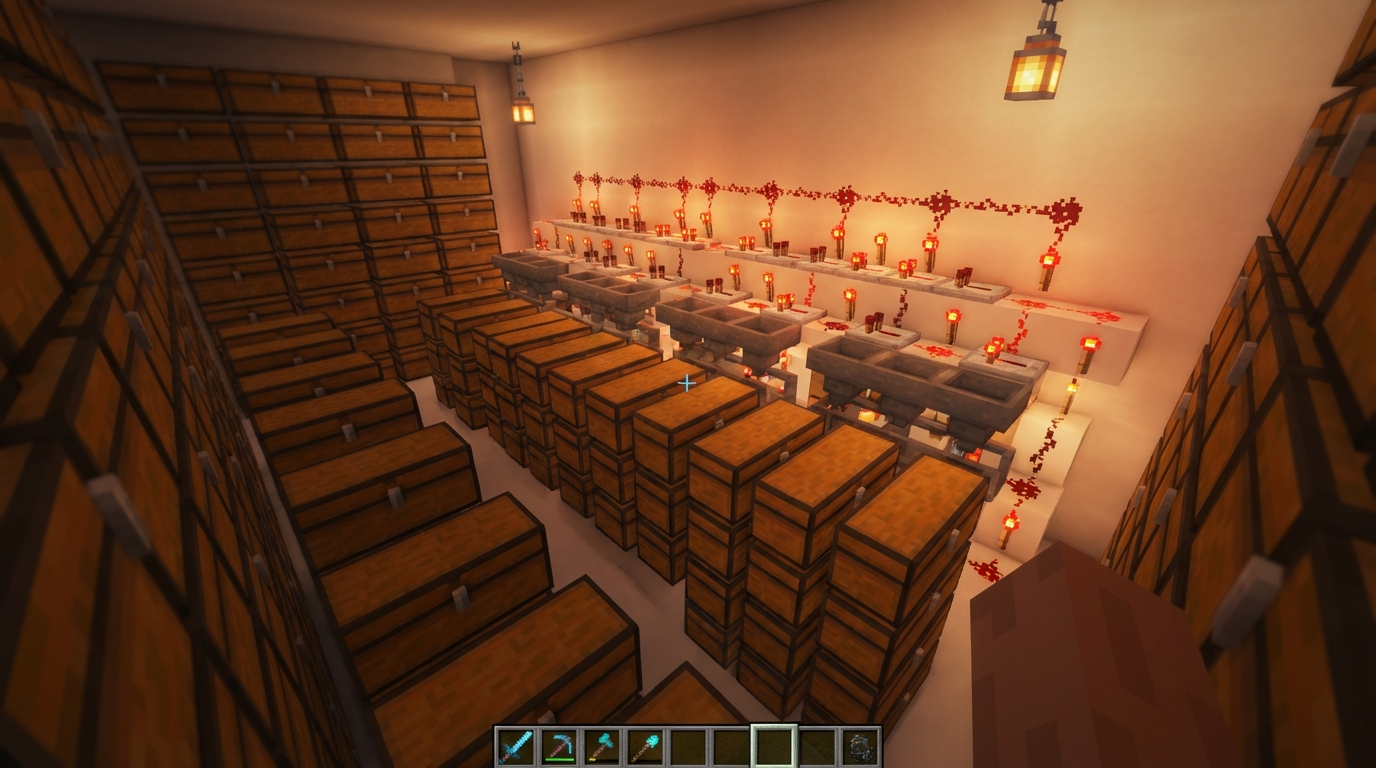
Building a massive farm for iron or gunpowder is exciting until you realize you have nowhere to put thousands of items. To handle this huge influx of resources, you simply need to line up your redstone modules side by side in a long row. Each module uses a comparator to check the hopper contents and a redstone torch to lock or unlock the flow of items. By chaining these units together, you create a seamless wall of organized chests that can scale your storage capacity as long as your base allows. This modular design means you can always add a new section for a different item whenever your farm expands.
The secret to a smooth system is the hopper line that runs across the very top of your sorting modules. As items travel along this path, they will only drop into a chest if they find a matching filter in the hopper below. To finish the build, place a final double chest at the very end of this top hopper line to act as your overflow storage. This catch-all container is perfect for collecting random blocks or unexpected drops that do not have a dedicated home yet. Having an overflow chest prevents your hoppers from backing up and ensures your redstone never breaks during a massive harvest.
Take Control of Your Survival Storage
Building your first auto sorter is a major turning point for any survival world. Instead of spending your precious playtime clicking through messy chests to find a stack of iron or some extra wood, you can now toss everything into a single input chest and get back to the fun parts of the game. This system handles the tedious work of organizing your loot from mining trips or mob farms while you focus on building your next big base. Having a clean storage room makes it much easier to see what resources you are low on before you head out on your next journey. It is a technical upgrade that truly improves your daily Minecraft routine.
Once those comparators and redstone torches are perfectly in place, your storage room becomes a high tech hub for all your adventures. You can easily expand the system later by adding more modules for new items like deepslate, copper, or blocks from the Nether. This modular design means your base can grow right along with your progress without needing a total redesign of your chests. Experienced players know that a reliable redstone sorter is the secret to staying organized during large scale projects. Now that the hard work of building the machine is finished, you can enjoy the peace of mind that comes with a perfectly sorted inventory.